
Enable camera on iphone or ipad lockscreen
instructions for ios11
instructions for ios10
instructions for ios7
instructions for ios5.1 and ios6
instructions for pre ios5
How to enable camera on iphone or ipad lockscreen in ios11.
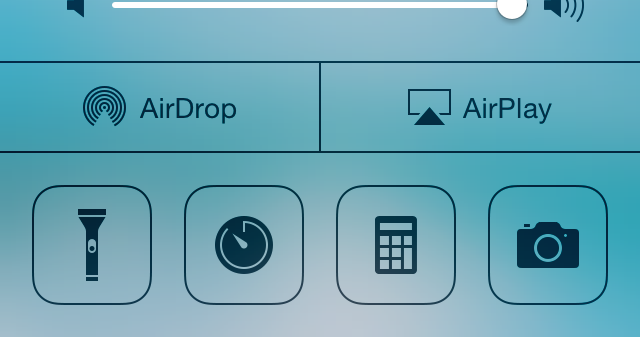
In iOS 11 the camera is part of your control center – to show the camera, swipe the your finger from the bottom of the screen towards the top of the screen – the control center will pop up from the bottom and you’ll see the camera icon.
How to enable camera on iphone or ipad lockscreen in ios10.
In iOS 10 the camera is hidden to the right of your lockscreen – to show the camera, swipe the your finger from the right hand side of the screen to the left hand side of the screen (it doesn’t matter if its at the top, middle or bottom of the screen) – the camera will slide in from the right!
How to enable camera on iphone or ipad lockscreen in ios7.
In Ios7 and above, there are two ways to access the camera from the lockscreen:
1) From the lockscreen itself
2) From the control center
To access the camera from the lockscreen in ios7, just slide the camera icon in the bottom right corner to the top of the screen.

To access the camera from the control center in ios7, activate control center (swipe up from the middle of the very bottom edge of the screen) and click the camera icon
How to enable camera on iphone or ipad lockscreen in ios5.1 and ios6
With ios 5.1 and ios6 the lockscreen camera has changed. In ios 5 you had to double click the home button to enable the camera icon. With ios 5.1 and ios6 the camera icon is already on the lockscreen in the bottom right hand corner.
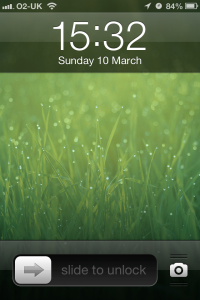
To activate the camera so that you can take all your pictures all you need to do is:
Swipe the icon up towards the top of the screen.
You will see that the camera app is underneath the lock screen! There is a section in the iphone user guide with some more info.
Having the camera set this way means that you can access the camera to take pictures quickly when the moment arises. Ive taken lots of photos that I’d have otherwise missed since apple changed the camera to work this way.
This will show you how to enable the camera in your ios5 iphone or ipad lock screen.
The camera icon is missing from the lock screen in older versions of ios until:
- In the iphone lock screen double tap the home button.
- You will see the camera icon.
- Touch the camera icon to access the camera app.
FAQ:
1) Can I make the camera icon always be on the lock screen without double tapping the home button?
It’s possible, with an update to ios 5.1 or above:D
2) How do I zoom in the camera app?
check this post


Leave a Reply
You must be logged in to post a comment.