This post will show you how to sync your mac osx contacts to gmail contacts. This will allow for a two-way sync – ie when you add a contact to your addressbook, its automatically added to google and when you add a contact to google its automatically added to your osx contacts.
How to sync your mac osx contacts to gmail contacts on osx lion and later:
Option 1:
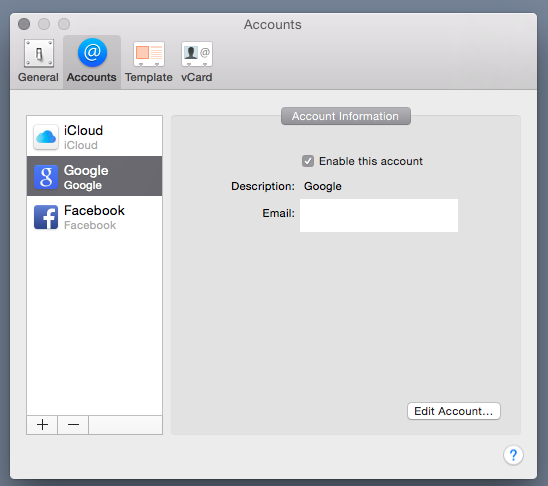
- Open addressbook (which is now called ‘contacts’)
- Goto preferences > accounts
- click the + in the bottom corner
- click ‘google’
- Enter your google account information
Option 2: CardDav
- Open addressbook (which is now called ‘contacts’)
- Goto preferences > accounts
- click the + in the bottom corner
- click Other > ‘CardDav’
- Enter your google account information – under server address, enter google.com
For addressbook on snow leopard and earlier:
Basically there are 3 steps.
- Enable google in the addressbook preferences
- Enable isync in the top bar thingy
- Sync
OK, so on to step one.
- Open addressbook. goto preferences > general.
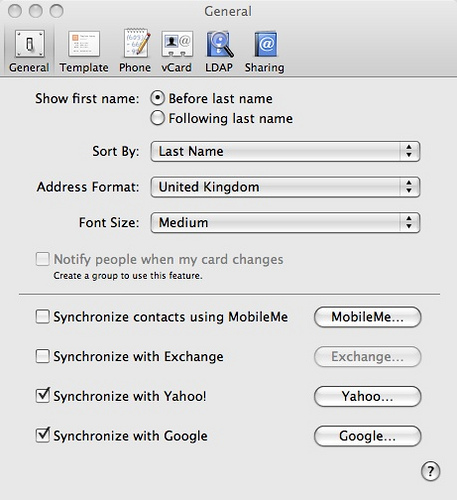
- Tick the box for enable google sync.
- Fill in your details.
If the option to enable google sync is missing then you need to plug-in an ipod touch or an iphone, or search google for a way to enable it without one.
Now on to step two.
- Open up isync (applications > isync)
- Goto preferences
- Tick enable syncing on this computer
- Tick ‘show status in menu bar’
Now on to step 3.
- Hit the big sync devices button in isync or goto the menu bar and click the sync icon
- Sync now.
- Done.
You will now have all your gmail contacts in addressbook and will most likely need to sort them all and merge a few. good luck.


So I have a MBP, an iPhone, and a Gmail account. I use my Gmail account for email, the calendar and contacts. I currently have my mail sent to the MBP Mail and my iPhone Mail.
I also have my contacts sync wirelessly from Gmail to my iPhone, and I have my calendar sync wirelessly from Gmail to my iPhone and to iCal.
The problems I have are when I check email on my iPhone it never marks it as read on my MBP Mail. When I read mail on my MBP it doesn’t mark it as read in my iPhone. Also my contacts in my iPhone sync with Gmail contacts wirelessly and seamlessly. However when I throw in the Mac Address Book I have to press the sync button, which is a manual process.
Any ideas to:
1) sync contacts between Gmail and MBP Address Book wireless
2) have mail that has been read on MBP Mail to show as read on iPhone and mail read on iPhone to show as read on MBP mail.
I’m using Exchange for the wireless sync between Gmail and the iPhone for contacts and the calendar and using IMAP for Gmail mail and the iPhone. Then I’m using CalDAV accounts to wirelessly sync my Gmail calendar with my MBP iCal which works great! Also using the CalDAV to wirelessly sync one of my calendars to my MS Outlook calendar at work with the Google Sync app.
-Michael
mjtruncale (at gmail)
sorry to never respond to you, michael.
the answer to your question (which took me an age to fully get working)
is here
http://jonathansblog.co.uk/ical-google-calendar-delegates-updated
that post has everything to get contacts, mail and calendars in sync between google, your mac and your iphone
I have recently tried to sync everything via my macbook (ical, address book) to my gmail account and iphone. I seem to have figured out calendar and mail no problem. Syncing isn’t having any issues. Yet I am still having issues with Address Book. Whenever I make a change in my address book on my mac, the change isn’t going to google. There seems to be no issue from my iphone to google. But the syncing between address book and google isn’t working. Any advice?
the addressbook sync isnt great. it will sync with gmail, but its not perfect. it does not always sync instantly. and sometimes it will pop up a dialog that says ‘do you want to use the contact in addressbook, or the one on google’ the answer to this dialog is: i want to use the one that was changed closest to the time now, so if i just changed the gmail contact, use that. if i just changed the addressbook contact, use that.
hopefully this will be fixed in 10.7 or sooner :)
Hello,
sorry, I am new at this, is this a one way sync? I want to sync my gmail to my address book on my macbook. I am afraid that my address book on my mac will overwrite my gmail contacts..
Thank you in advance! :)
its a multi way sync!
it works from each device –
if you add a contact in your mac it will be available on google, and on your phone, if you then add another contact on your phone it is available on google and your mac !!!!
Thanks Jonathan -I had to remove my BB from the syncing first… but my gmail contacts are still not synced with address book. They did sync with yahoo. HELP please. Address book seems to have synced exactly with yahoo but the new contacts (added within the last mo) that I have in gmail are not in address book.
it does that sometimes, the best way to fix it is to start again!!
I’m not sure if I’m getting this right, I am trying to sync my mac address book with my gmail address book so that I can then use the contacts on my HTC (yes I know I should have opted for an iphone!) I have followed the process it doesn’t allow the sync to happen, says I have no devices…do I need a device to do this or can I sync contacts to contacts.
hi sara, you need an iDevice for it to work =(
hi,
I have the same problem.
I followed all the directions, and when i try to sync with isync, i get – no devise..
I have an Android phone (galaxy), do I need to pair it? all I wanted is addressbook to sync with google contacts.
thanks,
Â
hi,
I have the same problem.
I followed all the directions, and when i try to sync with isync, i get – no devise..
I have an Android phone (galaxy), do I need to pair it? all I wanted is addressbook to sync with google contacts.
thanks,
Â
When I go to address book I have the option to sync with Yahoo but there’s no gmail option below it. What gives?
Thanks.
you need to plug an iphone 3gs or an iphone 4 or an ipad in to your mac.
it doesnt need to be yours, but it needs to be plugged once in for it to be activated.
is there a way around this ?
thxs
Hello – everyone trying this BEWARE! Â Not only did this not work, it actually replaced my thousands of gmail contacts with the handful of contacts in my yahoo email (which were all mostly yahoo messenger contacts)!!! Thank God for gmail’s restore to a past point feature otherwise I would have lost years of accumulated gmail contacts. Basically doing this means the Mac addressbook will sync *down* from yahoo and then upload those contacts to gmail and to the addressbook! If you care about your gmail contacts, dont do this.
it doesnt delete your contacts, it syncs both ways, but it syncs with your ‘my contacts’ list – gmail has ‘groups’ of contacts – all your actuial contacts are still there
i just did a couple of experiments with this;Â
yahoo is no longer needed for the google option – it used to be required to enable the tickbox.Â
so you shouldnt get this problem any more :)
If you’re looking for a way to sync your Mac Address Book with Gmail while maintaing your groups, you may want to try “Contacts Sync With Groups For Gmail” at the Mac App Store. Â You can read about it at:
http://itunes.apple.com/us/app/contacts-sync-with-groups/id451691288?ls=1&mt=12
If you’re looking for a way to sync your Mac Address Book with Gmail while maintaining your groups, you may want to try “Contacts Sync With Groups For Gmail” at the Mac App Store. Â You can read about it at:
http://itunes.apple.com/us/app/contacts-sync-with-groups/id451691288?ls=1&mt=12
anyone know if you can set this up to sync both a google apps (CalDAV) account AND a gmail account?
anyone know if you can set this up to sync both a google apps (CalDAV) account AND a gmail account?
Great. It works. Thank you very much!
nice one ! worked a treat cheers :-)
Handy. Thanks!
very useful. thankyou.
i did all the steps and it keeps duplicating my contacts. Does anyone know why and how to sort this problem?
How can I sync GROUPS (Gmail Contacts Groups) with Apple Mail?
Does anybody knows please?
Thanks
Goiram
I’m going to explain the “duplicate contacts” problem and ask why true sync is not working.
There are two options for syncing. You can go to Contacts>Preferences>Accounts> + and add a CalDAV connector to the gmail account. Under this condition, google contacts do not sync with your locally stored contacts on the MAC. After connecting the Google account, you can see all of its contacts under “All Google” . You can see all the contacts stored on the Mac under “On my Mac” If you click on the “All Contacts” on the top of the page you can see all combined contacts. So you will see a duplicate of all your contacts.
There is a second option if you navigate to Accounts as before> On My Mac Local. There is a button to Synchronize with Google. I can’t get this one to work because it refuses to access the account: incorrect Name or Password. I’m using the same credentials that I use to connect the gmail account. So it could be a Google bug (or feature). Does anyone know why this is happening? I may have to find an app that either bypasses Google on the way to Android, or makes a true sync happen.