
This guide will show you the iPhone stop screen rotating trick when you turn the device on it’s side. On an iPhone the feature that you use to stop the screen rotating is Orientation Lock. Orientation lock has been available on the iPhone for years now. In every major version Apple decide to move the location of the icon. The icon is a padlock with an encompassing circle.
I have documented the changes in the location of the orientation lock over the years. This article now contains instructions for every major version of iOS. It shows the location of the feature over time.
How to stop iPhone rotating screen
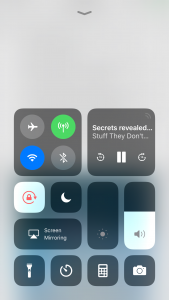
In ios11 the portrait orientation lock is now on the dash screen. Here’s how to stop your iPhone screen rotating:
- swipe up from the bottom of the screen to show the dash screen
- You will see a lot of controls, including volume, brightness, music controls and others
- under the icons for WiFi, Bluetooth and airplane mode you will see the padlock icon
- click the padlock icon to toggle the orientation lock
- when orientation lock is enabled, the icon will have a white background
To disable the iPhone Orientation lock click the icon again (it will have a transparent background).
I have added an image and a video below to help you.
iPhone stop screen rotating (ios10)
In ios10 the portrait orientation lock button is on the control-center screen.
- Swipe from the bottom of your screen upwards to show the control-center
(opposite from what you do for the notification center at the top of your screen) - You will now see the control center with lots of icons and options.
- If you see the music and volume controls, swipe to the screen on the left
- By default portrait orientation lock is the last icon in the first row.
- If its enabled it will have a red background. if it is disabled, it will have a transparent background
How to stop iPhone screen rotating with Portrait orientation lock in iOS
In ios7 the portrait orientation lock button has moved. It is on the control-center screen. This is the same for iOS 8 and iOS9.
To access the control-center:
- Swipe from the bottom of your screen upwards to show the control center
(like you do for the notification center at the top of your screen) - You will now see the control center with lots of icons and options.
- By default portrait orientation lock is the last icon in the first row.
- If its enabled it will have a white outline.
iPhone stop screen rotating in iOS6 and Below
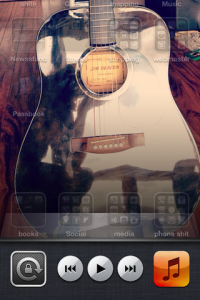
To engage orientation lock in iOS 6 and below; follow these simple instructions:
- Double click the home button
the one with the square on it on your iPhone / iPad. - This takes you to the ‘multitasking’ part.
- Swipe right on the icons at the bottom.
- The first icon has a padlock on it.
- Click it to engage orientation lock
You can now use your iPhone without the screen flipping!!!! You can lock the screen using this technique in either portrait or landscape mode.
To disable the lock, simply click the padlock icon again. Your iPhone will return to normal flipping mode :)
An accelerometer controls the screen flipping action inside your iPhone. A sensor inside the phone determines the orientation of the device. Its the same sensor that allows you to control driving games by tilting your screen to the left or right.
Edit: check here for a post about how to use your iPad’s side switch for portrait orientation lock
Sources: apple support


Leave a Reply
You must be logged in to post a comment.