
This guide will show you the iPhone stop screen rotating trick when you turn the device on it’s side. On an iPhone the feature that you use to stop the screen rotating is Orientation Lock. Orientation lock has been available on the iPhone for years now. In every major version Apple decide to move the location of the icon. The icon is a padlock with an encompassing circle.
I have documented the changes in the location of the orientation lock over the years. This article now contains instructions for every major version of iOS. It shows the location of the feature over time.
How to stop iPhone rotating screen
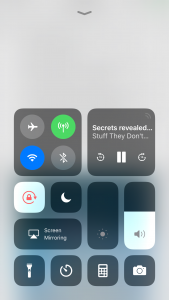
In ios11 the portrait orientation lock is now on the dash screen. Here’s how to stop your iPhone screen rotating:
- swipe up from the bottom of the screen to show the dash screen
- You will see a lot of controls, including volume, brightness, music controls and others
- under the icons for WiFi, Bluetooth and airplane mode you will see the padlock icon
- click the padlock icon to toggle the orientation lock
- when orientation lock is enabled, the icon will have a white background
To disable the iPhone Orientation lock click the icon again (it will have a transparent background).
I have added an image and a video below to help you.
iPhone stop screen rotating (ios10)
In ios10 the portrait orientation lock button is on the control-center screen.
- Swipe from the bottom of your screen upwards to show the control-center
(opposite from what you do for the notification center at the top of your screen) - You will now see the control center with lots of icons and options.
- If you see the music and volume controls, swipe to the screen on the left
- By default portrait orientation lock is the last icon in the first row.
- If its enabled it will have a red background. if it is disabled, it will have a transparent background
How to stop iPhone screen rotating with Portrait orientation lock in iOS
In ios7 the portrait orientation lock button has moved. It is on the control-center screen. This is the same for iOS 8 and iOS9.
To access the control-center:
- Swipe from the bottom of your screen upwards to show the control center
(like you do for the notification center at the top of your screen) - You will now see the control center with lots of icons and options.
- By default portrait orientation lock is the last icon in the first row.
- If its enabled it will have a white outline.
iPhone stop screen rotating in iOS6 and Below
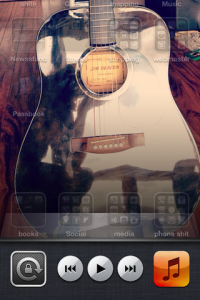
To engage orientation lock in iOS 6 and below; follow these simple instructions:
- Double click the home button
the one with the square on it on your iPhone / iPad. - This takes you to the ‘multitasking’ part.
- Swipe right on the icons at the bottom.
- The first icon has a padlock on it.
- Click it to engage orientation lock
You can now use your iPhone without the screen flipping!!!! You can lock the screen using this technique in either portrait or landscape mode.
To disable the lock, simply click the padlock icon again. Your iPhone will return to normal flipping mode :)
An accelerometer controls the screen flipping action inside your iPhone. A sensor inside the phone determines the orientation of the device. Its the same sensor that allows you to control driving games by tilting your screen to the left or right.
Edit: check here for a post about how to use your iPad’s side switch for portrait orientation lock
Sources: apple support
55 responses to “IPhone stop screen rotating with orientation lock”
Thanks Jonathan!
thank you so much this was sooooooooo annoying!
Thank you very much! This has sorted out an ongoing headache without having to resort to 3rd party apps. Much appreciated!
thx so much i was annoyed so much and then i called apple store and hardware & softeware technician and no solution now i got the easy solution .. thx so much
Thanks a lot man.NOw i can easily do my tasks on iphone while lying on bed :p
IT REALLY WORKS THANKS A LOT
BEEN DRIVING ME CRAZY TRYING TO VIEW MY PHOTOS.
THANK YOU FOR SHARING YOUR KNOWLEDGE FREELY.
Top man! This has been bugging me for ages.
Top man and a google search, cant fault you!!
Perfect!!!
where can i find this program? i looked for if in cydia and installous…
hahahah sry people, i found it :D
THX MAN
You little beuty!!!! I’ve been battling with my iphone Sat Nav for the last year as I use it on my motorbike, but it would flip upside down all the time, usually when coming up to intersections. This has fixed it. You made my day (and next time I get a major update, maybe I’ll read the release notes!!)
THANK YOU!!
I love the Internet as it made our lives in someways sooo much easier. I wanted to know where to set this lock. I googled . 1st link I clicked. I found it.
Allah the most high be praised for allowing human beings intelligence to have the Internet created.
THANK YOU
Wish I’d looked sooner. Thank you!!!
that has been driving me nuts many thanks
Thanks u so much i was going crazy on how to fix this i give 5 stars out of 5
Thank you so much. It’s very useful
haha  thanks!  I couldnt figure out what I had done that was keeping my screen from rotating!
Hahaha. Super like! Simple free help. Thanks man
Thank you sooooo much!!!! Awesome!!!
Awesome! Now I look smarter than my husband when it comes to our iPhones! Haha
Thnx for making ppls life easier on the go… AND THNK YOU MR. JOBS FOR PUTTING IN THE POTRAIT LOCK FOR US….
Thank you so much mate. Its so hidden.
Where is it man ?
Thank you so fucking much!
Thankyou this has driven me insane
Wahoo!!! Thank you.
Nice post. Thanks for the post.
There is another option for this which i user more which is to enable Touch accessibily option and use the shortcut. As mentioned other options are available too for Rotation lock on iPhone / iPod / iPad iOS
Thanks!!!
That’s awesome! Thanks a million!! It worked
Thanks a lot, finally I unlocked again
U are amazing how did u find that
Perfect. I swiped to the right though.
Thanks!!! Never would’ve found it!
u r a gem my frnd… its so hidden.. thanks alot for this beautiful post.
Now that was easy! thanks
Darn. I really was hoping to have it be able to lock when sideways, too.
When I hold down the button it takes me to voice control?
Thank you so much! :)
That’s gold it works! Thanks
wow thanks that was greatly appreciated… when i record videos now will it post sideways or vertical?
Thank you soooo much. It has been driving me crazy.
Your instructional writing skills are top notch, the best! Detailed, exact, and easy to follow. The best I’ve seen for iphone tips and how-to’s. …And you even include visuals—so helpful. Thank you!
Omg this is amazing… Slightly different on the new iOS 7.2 but rite direction thank you
Wonderful! Thank you! I made a lifehacker car-crib for my ipod touch, but having the music player in portrait mode is so frustrating! This is a great bit of knowledge!
Every time I time I exit out of an app my screen turns sideways whether my portrait orientation is locked or not. How do I fix this?
Love it man…your too good at this .
Thank you
thank you. it worked beautifully
Thank you!
I have a iPhone 6 & I was wondering how can I stop it from going sideways
Still can’t lock it in landscape mode. For some idiotic reason.