
This post will show you how to sync your google calendar with ical.
jump to:
How to sync your google calendar with ical in osx lion, mountain lion and Mavericks
In osx snow leopard it was possible to get multiple google calendars in your ical without using the delegates functionality.
In osx lion and later it’s not possible (that I know of, and I have tried) without using the delegates functions. In osx lion and onwards (mountain lion / mavericks) you might notice that you can only see your primary google calendar. To fix this you will need to use delegates.
If you don’t yet have a google calendar setup in ical yet, then its easy to sync your google calendar with ical:
- open ical, goto ical menu > preferences
- goto accounts > click the + at the bottom left corner
- pick ‘google’ as the type
- fill in your google calendar username and password
Once you have your account setup then you will notice that it hasn’t imported every calendar.
From a page that’s well hidden in the google forums and is actually to do with iPhones (I needed to do this step to get the delegates to show on my mac anyway…)
By default only your primary calendar will be synced to your device. You can sync additional calendars by visiting the following page from any web browser:
https://www.google.com/calendar/iphoneselect
(Google Apps users can go to https://www.google.com/calendar/hosted/your_domain/iphoneselect, replacing ‘your_domain’ with your actual domain name.)
Select the calendars you’d like to sync, and click Save. The selected calendars will display on your device at the time of the next sync.
You need to visit that page from your mac, and click all the calendars you want to sync.
Once you have selected the calendars you want, return to ical
- ical preferences > accounts
- click on your google calendar account
- goto the delegation tab
- you will now see all of your google calendars.
- tick the ones you want
You will now have all of your google calendars in your ical on osx lion!
How to show multiple google calendars in osx snow leopard only:
These instructions will tell you what a delegate is, how to get rid of it if you need to, and how to get your ical and iphone to be properly in sync with multiple top-level calendars.
I just had a look at the top keywords for the last 7 days. Not surprisingly there are lots of entries for ‘ical delegates’, ‘google calendar’ + ‘delegates’, ‘what are ical delegates’ etc. so, I had a look at the stuff I did with google calendar, syncing it to your mac’s ical and thought the explanation was a little poor.
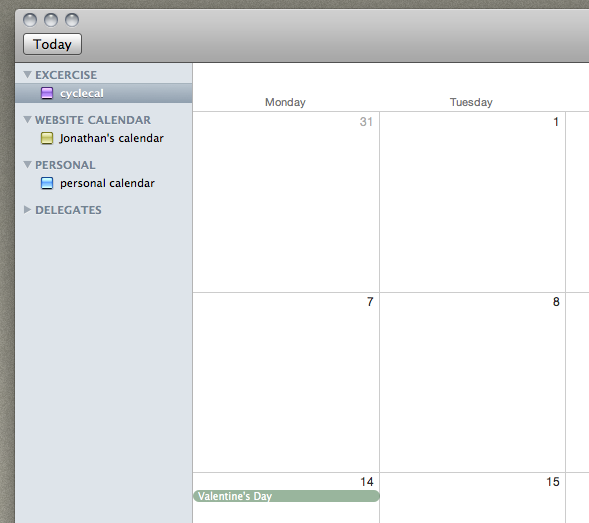
First off, what is a delegate, and why should you be concerned about them:
A delegate is basically any calendar that’s not your main one. You should be concerned because if you add a google calendar to your ical then all the sub calendars appear as delegates.
So if I have a calendar named ‘work’ and one named ‘personal’ and one named ‘gigs to see’ then ‘work’ would be the main one (the main one is the first calendar you made) and ‘personal’ and ‘gigs to see’ would be delegates.
It’s ok, and its workable, unless you sync your ical to your iPhone with iTunes (check out how to sync your google calendar to your iPhone calendar here ).
To sync your google calendar with ical without having them appear as delegates follow these instructions:
- open ical, goto preferences and accounts.
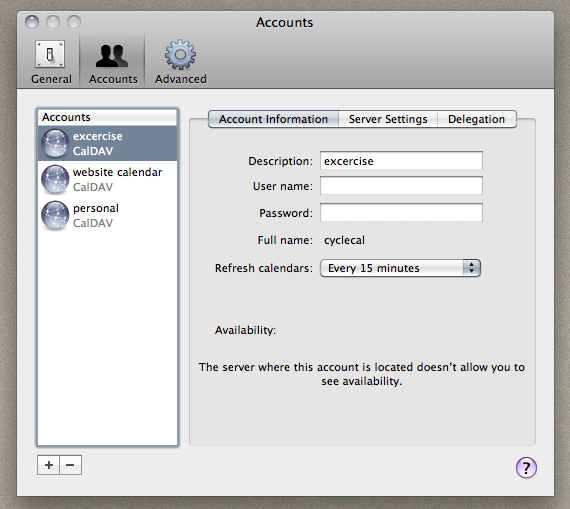
- hit the + button in the bottom left
- fill in your google email address, eg bob.smith@gmail.com, remove the @gmail.com part if this is not the main calendar for your account
- fill in your password and it will get the rest of the server stuff by itself.
- you then need to put in the url of your calendar in the server settings tab.
To get the url to use:
- goto calendar.google.com
- get to the settings for the calendar you wish to import
- you will see the address of the calendar

Copy this into a text editor and make it read like:
/calendar/dav/randomstring @group.calendar.google.com/user
- put this in to the server settings tab in ical as the ‘server path’
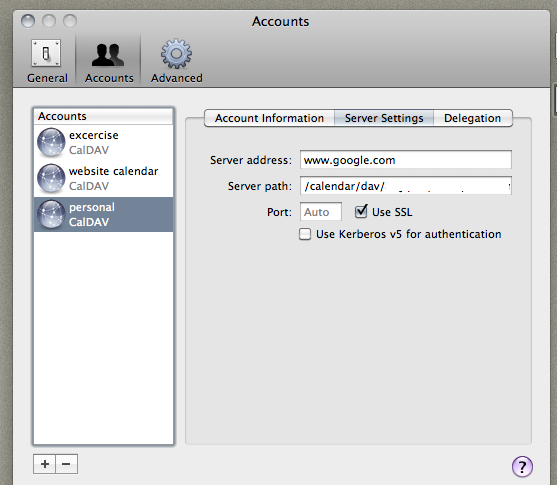
Repeat with each calendar in your google calendar by making a new account in ical for each calendar you have in google calendar. remembering to remove the @gmail.com part if this is not the main calendar for your account
Sync your google calendar with ical: FAQ
I’ve not found a way to make them all appear in one ical calendar. They are all separate calendars listed down the side, but they usually come up with the name they were given in google calendars. I think the easiest way would be to go into google calendars and rename them to easy things. I have one called personal calendar, one called cycle calendar, one called work, etc. you can get them all to display in ical at the same time by ticking the small boxes. Each calendar will be a different colour =)
You need to put this in the server address:
https://www.google.com/calendar/dav/
before the
randomstring@group.calendar.google.com/user
so that it looks like
https://www.google.com/calendar/dav/randomstring@group.calendar.google.com/user
you need to do this for every calendar that you want to appear
You can move an event from one calendar to another in ical by right clicking it and going to edit. It will have calendar: and the calendar name. Click on that and you can change the calendar =)
If you have the iphone setup to sync your contacts, sync your google calendar with ical and mail from google (check out how to sync your google calendar to your iphone calendar here) then any event you add to any calendar (on your mac, on your iphone or via google calendar – or by any other method that adds the event to any of the devices) will be synced to every one of the other devices. That way I can automatically add events to my calendars from my mail.app, or by adding them in google calendar when im at work (by syncing outlook to my ‘work’ calendar) or I can add them on my iphone calendar, and they are instantly available on any of the other places!
Try it and see for yourself. look at the screenshots above. You will clearly see THREE caldav accounts. If you can’t get it to work, then remove the @gmail.com part if this is not the main calendar for your account
58 responses to “Sync your google calendar with ical”
Help! I don’t quite get your instructions. When you create “new calendar” do you click on “Create calendar on Gmail” in iCal?
In other words, where I’m getting stuck is how to create new calendar. There are so many ways to do it but I haven’t found the way that is appropriate to your instructions.
Thanks!
sorry about that, by add calendar, i mean
open ical, goto preferences and then accounts.
hit the + button
=)
i feel like these instructions ALMOST have where i need to be. i create the new calendar in ical as a new account, as you describe. i paste the url to the delegated calendar, as displayed in google (the randomstring@) into…where? i use my regular gmail address as the username, use my password, and then use the randomstring@ as the account URL? or do i use the randomstring@ as the username, and my regular password?
sorry if i’m being dense, but none of this is working for me. the calendar i REALLY want displayed on my iphone is a google calendar that is being shared with me with no write access. however, i have also been trying the above instructions with my own additional calendar that i created, in case that the error was due to sharing. but i keep getting “Account information not found / code 1” in ical.
for the record, my main google calendar does show up and works fine. on the iphone i use CalDav and it’s great. I can’t use exchange because i have a work email address that requires it. :(
thank you! -brian
ok, what you need to do is to goto preferences in ical, then to accounts. hit the + button at the bottom, then type in the same username and password for your first google calendar account (its the same account, just with a different calendar) then in the settings part for that account you paste in the https:// string with the random string from the settings page in your google calendar from your browser ! keep trying – you will get it eventually and you will see how simple it is to add loads of them!
anyone reading this thread, i found the answer here:
http://discussions.apple.com/thread.jspa?messageID=10160697
ayo.Kayo on june 25th provides the answer. thanks jonathan for getting me closer!
I am not sure where people run into issues with the delegates? I have iCal setup vanilla with my sub calendars as delegates and have no issues adding events from iCal, the browser or my iPhone and they all sync up instantly with eachother. The only difference I note from most of the instructions is that I use a google apps account. any insight on that?
no idea⦠is your phone synced to your google apps via the mobile exchange, or does it sync directly to your ical ? (i take it from your comment that it syncs to the google apps via exchange) it might be that google apps is setup differently than vanilla gmail / google calendar, or that apple has changed the way that syncing works -either with one of the updates to snow leopard, or one of the updates to iphone os. hopefully in the future we wont need to use my method
Hi Jonathan,
is there a way to merge the different google calendars under one header? in ical there appears the header “Google Calendar” for each of the calendars i added with you method described above… :(
Cheers, Gesa
ive not found a way to make them all appear in one ical calendar – they are all separate calendars listed down the side, but they usually come up with the name they were given in google calendars – i think the easiest way would be to go into google calendars and rename them to easy things – i have one called personal calendar, one called cycle calendar, one called ‘work’, etc. you can get them all to display in ical at the same time by ticking the small boxes – each calendar will be a different colour =)
hope this helps a little – any other questions, feel free to ask =)
Thanks Jonathan for your reply! I was just wondering if it was possible to move them into one calender, since you cannot switch entries between calenders this way!? or is there a way to work around that?
Thanks again and bests, Gesa
I use a similar method to sync my Google calendar with my ancient SonyEricson p910i and also to my Active desktop calendar.(http://www.xemico.com/adc/index.html)
Now all I need is something to put in the calendar! :-)
Shalom
This doesn’t work at all, iCal won’t let anyone set up duplicate CalDav accounts for the same Gmail address
i only posted it here because its the way that i figured it out on my mac. it works for me, and everyone else that has used it. did you follow the instructions, or did u just flame? :)
Hi Jonathan. Found this post through a search, thanks for the instructions. This works for me, sort of except that my calendars are not appearing under one ‘accounts’, it is creating a new header for each calendar, so now I have three headers (I have three google calendars) with one calendar under. How do I fix this? Thanks very much for your post!
there isnt a way to fix it – thats just the way that ical displays them – if you get to the point that you have your 3 calendars all under different headers, then it will be working as you would expect it to work as if they were under one header =)
hey! i need help! i found these same instructions from another site as well (http://www.google.com/support/forum/p/Calendar/thread?tid=4e5c309678c75983&hl=en), and despite me following them exactly, i keep getting error messages.
Originally I created a google account in iCal, but that created my one primary calendar with about 20 delegates, which is not what I want. Now that I’m trying to go back, I’m getting lost. One source said to go to iCal>preferences>accounts>delegations and uncheck all the calendars, and then to create a new account following your instructions. It said to make the new acount under CalDAV…
It also said to copy this code: [https://www.google.com/calendar/dav/__________@gmail.com/user]
and paste our calendar ID in the _________ section, then paste that whole thing into the server address for creating a new account in iCal.
I am confused; do we paste only the calendar ID from google calendar and nothing else into the server address box? (Ex. bdj2sd5mghchfh8h0j3c3uh088@group.calendar.google.com )Because that hasn’t worked for me.
Or do we need to add onto it or change it at all when putting that in the address box for iCal? (Ex. https://www.google.com/calendar/dav/bdj2sd5mghchfh8h0j3c3uh088@group.calendar.google.com@gmail.com/user)Because that hasn’t worked either.
I feel like I’ve tried everything and nothing is working. Is there anyway I can contact you directly (via email or something) to go through this step by step and figure out what’s going wrong? I really need to figure this out because these calendars are what I use to manage my work schedule between multiple clients, but all the syncing issues I’m having are causing my organization with work to suffer.
Please help!
http://i295.photobucket.com/albums/mm150/haleymariemackenzie/Screenshot2010-06-10at32029PM.png
http://i295.photobucket.com/albums/mm150/haleymariemackenzie/Screenshot2010-06-10at32438PM-1.jpg
hi haley;
you need to put this in the server address:
https://www.google.com/calendar/dav/
before the randomstring@group.calendar.google.com/user
so that it looks like
https://www.google.com/calendar/dav/randomstring@group.calendar.google.com/user
you need to do this for every calendar that you want to appear
hope this helps
GREAT instructions!!! Worked great for me but had to remember to quit iCal after each account added! THANKS!
Excellent. Thanks!
The problem with having different headers for you calendars is that it doesn’t let you “switch” an event from one calender to another by simply changing the tab. Now you have to delete it and creat it in another calender. I don’t see why they would make it so hard. Can’t we organize our own calendars on the side?
hmmm
good point!
I have set a default calendar (my personal one) so that if i do make a mistake it all goes in there instead =)
Hi – just to be clear, these instructions don’t help you sync FROM iCal to Google calendar right? They just sync FROM Google to iCal. My problem is that I have incoming meeting invites from others in to iCal that I cannot get to sync up to Google.
it sets up a two way sync;
anything you add in google calendar will appear in ical, and anything you add in ical will appear in google calendar
=)
All I can say is… THANK YOU!!! THANK YOU!!! THANK YOU!!! THANK YOU!!! THANK YOU!!! THANK YOU!!! THANK YOU!!! THANK YOU!!! THANK YOU!!! THANK YOU!!! THANK YOU!!! THANK YOU!!!
… oh and right on. I was going crazy trying to figure this out. =)
This is a link that maybe can help you if you have problems with this sync… http://www.google.com/support/forum/p/Calendar/thread?tid=4e5c309678c75983&hl=en
so i’m an absolute novice at tech stuff, so forgive me if i’m missing something simple.
i set up a caldav account with the iCal on my mac, and since i have only 1 primary google calendar, anything i add on google shows up right away on iCal. however, none of the entries on my iCal show up on my google calendar. (i’ve multiple iCal calendars). How do i fix this please?
hi jonathan, i have multiple calendars in ical (love color-coding each aspect of my life and business) and i use google calendar. i am completely confused as to syncing gooflw and ical with each other while maintaining my color coding in ical. for example, i will be at a business lunch and create an event in google calendar and then when i get back home or to the studio it shows up on ical, but it isn’t in the appropriate color coded calendar. sometimes i can drag and drop it onto the appropriate calendar in ical and other times i cannot. and sometimes moving the event into a different ical calendar removes it from my online google calendar. needless to say, i don’t know where i am suppose to be and when with these variables. is there a way to make this more seamless? or should i be using a different application/software? thanks so very much!
Hi alyssa
when you create an event in google calendar you need to assign it to the correctly named calendar [eg, i have a personal calendar that is blud in google, but red in my ical, but it is the same name – personal calendar]
the same goes for creating events in ical – just make sure you assign it to the correct calendar [you create an event in google by double clicking somewhere in that day and it pops up. in ical you right click and select ‘create event’ it will create an event and if you double click it then you can change the calendar it belongs to. the next time you create an event it will be in the calendar you selected the last time]
Hi, I am having the same issues as Rob. We have one email address ie xxx@yyy.com with a calendar. We have sub calendars for our 7 workers, so I can centrally schedule their appointments. This works fine and they can link into it and see as delegates, but when they link their iphones, they only see the central calendar, not theirs.
When I went to set this up and did add account, it will not let me add xxx@yyy.com more than once.
I don’t want to have to create individual zzz@yyy.com, vvv@yyy.com for each of them – so how can I get around this?
thanks
Your instructions worked for me. I was working go get iCal to sync with Bento, but Bento wouldn’t “see” delegates. The one word I would add is that you have to select the type “caldav” not google–ical won’t let you create multiple google calendars, but CalDav works fine. Thanks for the help
Jonathan,
Your last FAQ is a statement about Google not allowing duplicate CalDAV accounts for the same email address. I have the same issue. Your answer “try it and see for yourself” is not clear. Is there a workaround?
Thanks,
Paul
look at the screenshot. it works. you should have username as your username, not username@gmail.com you also have to have the address of the calendar correct
I can add (2) Google/Gmail accounts inside iCal, then when I try to add the 3rd one it tells me that”
“all the CalDAV accounts are already configures. Configuring duplicate accounts is not supported”.
How do I get around this?
I can delegate them with no problem…
Thanks in advance!
look at the screenshot. it works.
you should have username as your username, not username@gmail.com
you also have to have the address for the calendar filled in correctly.
Descriptions are missing that you need to choose ‘CalDAV’ in the account type.
generally it picks up the type on its own [from the address of your calendar] but if its not picking it up, then yeah, select caldav :)
You can’t create a second account once your main one is set up. However if you have the main one set up, change the server path to one of your sub calendars as instructed above. Then you can add your main one again. Similarly change the path to another sub calendar etc etc
Let me amend what I said before.
In order to get my ‘sub’ calendars set up properly, I had to add them as instructed above. I had to add the ‘main’ calendar LAST (or not at all, i just leave the main ‘username@gmail.com’ calendar empty)
Awesome. Thanks for figuring this one out â it works great!
hi jonathan –
this is very strange. i used your tutorial in the past to set this up on my home computer, to connect to my google apps account. i just tried to set it up on my work computer – using identical versions of iCal and Snow Leopard – and it doesn’t work. it just says the username/pass aren’t accepted.
what’s extra weird is i went into user/library/calendars on my home machine (where it works) and just copied the entire directory into the /library folder on my work machine. and i get the same error.
puzzling!
very odd!
let me know if you find a solution (it may be something in google?)
I tried this, and it says “No Caldav server was found at that specified address”
What am I doing wrong? I selected caldav and then put my username (without @gmail.com) and password and then the calendar address from Google Calendar (one of my other calendars, not my main calendar)
try adding it with the @gmail.com part and see if that works [its a bit flakey at times]
It won’t let me NOT include the @gmail.com part of my user name…
THANKS!!!!!!
Hi. No idea if I’ve wandered into the right place, but here goes:
I can’t open iCal on my MacBook Pro. When I try, I get this:
“The server did not recognize your user name or password for account [my Gmail address]. Make sure you enter them correctly.”
Apple told me I need to remove the Gmail settings from my iCal, but offered to do it only if I pay.Â
Anyone know how to solve this problem?
yeah, you need to remove the gmail account, and then re-add it.
in lion, just go to system prefs > mail, contacts & calendars.
then delete, or change your gmail account
It would seem that this would work just fine with 10.6.x but with the new way that 10.7.x adds mail, contacts, and calendar accounts I cannot figure out a way to make this trick work properly. Any suggestions?
i dont ahve any connection at the moment (just moved into a new flat) but as soon as i get connected ill have a dig about and see if i can figure it out again
That’s plani crazy. Why yahoo calendari work without any “delegate”?
I have tried everything and I still can’t get my iCal to sync with my google apps account. for the past 3 months things have been fine, and now nothing. I keep getting this error. I’ve even tried to call google and they keep talking about some pin # and where to get it, but it’s no where to be found.Â
you dont mention what error you got, also, i cant provide support for google.
if they have told you about a pin, then you have enabled two factor authentication.
with two factor authentication they send a code to your cell phone when you try to log in to google and you have to enter the code there.
you could probably just disable two factor authentication and get it to work…
HI, Have you written an update for this issue and lion? Â Or is it pretty much the same?
Hi! Your blog is great! I have added an exchange and can see my google calendar entries on my iPad – however, when I try and create a new calendar event onipad- and I choose a delegate’s calendar – the INVITEE option disappears – any way around this PLEASE?! Thank-You!
THANK YOU! i use istudiez pro on all of my devices and could not get the mac app to sync to the delegate google calendars… you truly made my week!
Thanks, I’ve been looking for this for so long :)
Thanks for this Jonathan. Working well for me in iCal Version 4.0.4 (1395.7) on OS X 10.6.8 using calendars configured for Google Apps (in addition to my GMail accounts). I discovered that I needed to add the non-primary calendars first, as adding the primary calendar prevents any further additions from the same account.
I guess that if I want to add further non-primary calendars to my Google Apps account and have them show up in iCal, then I’ll need to either (a) delete the primary calendar from iCal then add the new non-primary calendar followed by the primary calendar back in, or (b) move the primary calendar and all its events into a non-primary calendar, and just add non-primary calendars into iCal.
Only as delegates though, which sucks! I mean, none of this is actually necessary because if you set-up a Google account in iCal and go to delegates then they’re there already, just need ticking.
I am trying to sync my iCal with google, not the other way around, so that whatever I put in iCal will go automatically to google. Because I have an android phone, I have to use google’s calendar. I have figured out all you say above and it works great, but…. then I lose iCloud and I have my kids calendars linked in iCloud so that if I add an event to their calendar they get it on their iPads or macs. So how can I add iCal calendar events to the cloud as well as sync the same calendar event to google calendar??
bless you! Couldn’t figure out why I lost all my delegates quite suddenly on my iOS devices (and frankly still don’t know why it happened), but this got them all back. Thank you for the link!
Your a great man! Saved me a ton of headache!
I just had to redo this because of some syncing issues, and what happens now is the delegates just won’t sync. They appear just fine in calendar, but I get no data behind them. Ugh.
Thank you for the info. I was able to see them in independent windows but this allows me to see all in the primary window at once. I love it. I could never get this to work correctly before.
I have OSX 10.7 and iCal 5.0.3, and I’ve been syncing with Google calendar ok for quite some time. However, recently (last month or so) I’ve been getting the issue of duplicate calendar entries. When I look under my calendar listing, it shows my calendars both under the “Google” heading, and under the “Delegates” heading (see attached screengrab). If they’re both selected I get everything twice. If I switch off all the google ones, they switch back on randomly (annoying). Any ideas? Thanks.
I am running 10.7.5, and I had no problem adding an additional Google calendar and have the Mac Sync Services immediately recognize the new calendar and its (just 1 for now) event. Seems like Apple has fixed this and the workaround is no longer required?
HEllo, it looks that it doesn’work anymore with Yosemite :(