
Investigating uPNP with python for fun and profit.
SSDP is an interesting uPNP protocol – devices advertise their capabilities on the network and leak valuable information. SSDP is very similar to http, except its run over UDP.
https://tools.ietf.org/html/draft-cai-ssdp-v1-03
SSDP clients discover SSDP services using the reserved local administrative scope multicast address 239.255.255.250 over the SSDP port.
ssdp:discover requests sent to the SSDP multicast channel/port MUST have a request-URI of ““. Note that future specifications may allow for other request-URIs to be used so implementations based on this specification MUST be ready to ignore ssdp:discover requests on the SSDP multicast channel/port with a request-URI other than “”.
ITEF SSDP Draft
Only SSDP services that have a service type that matches the value in the ST header MAY respond to a ssdp:discover request on the SSDP multicast channel/port
A response to a ssdp:discover request SHOULD include the service’s location expressed through the Location and/or AL header. A successful response to a ssdp:discover request MUST also include the ST and USN headers.
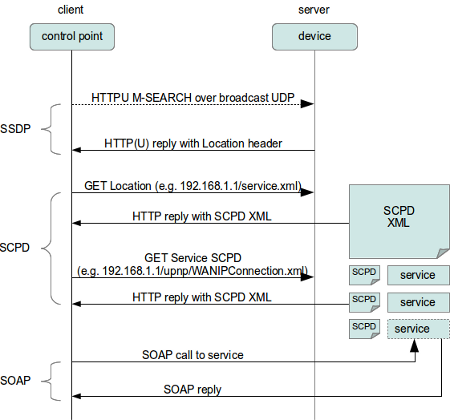
We can, using scapy in python craft a broadcast packet which will trigger a response from our SSDP enabled devices in our network:
#!/usr/bin/env python3
from scapy.all import *
from scapy.layers.l2 import arping as scapy_arping
from scapy.all import conf as scapy_conf

#craft a payload, with M-SEARCH, ssdp:discover for all devices
payload = "\r\n".join([
        'M-SEARCH * HTTP/1.1',
        'HOST: 239.255.255.250:1900',
        'Accept: */*',
        'MAN: "ssdp:discover"',
        'ST: ssdp:all',
        'MX: 1',
        '',
        ''])
#send that packet out
send(IP(dst="239.255.255.250") / UDP(sport=13373, dport=1900) / payload)
#listen for replies, for 15 seconds
packets = sniff(filter="udp and port 1900", timeout=15)
for p in packets:
    if UDP in p:
        #print out any results
        print(p[UDP].load.decode('UTF-8'))
This will give us a nice output showing some of the available devices.
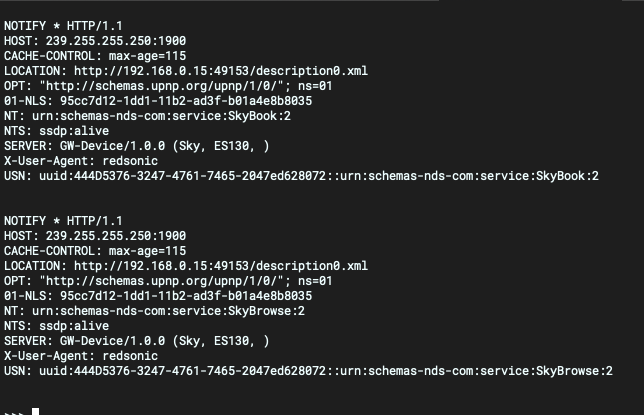
The interesting field here is the LOCATION (or AL): field – that points us to a service on the device which we can investigate further.
An easy way to investigate is just to copy/paste these urls into a browser:
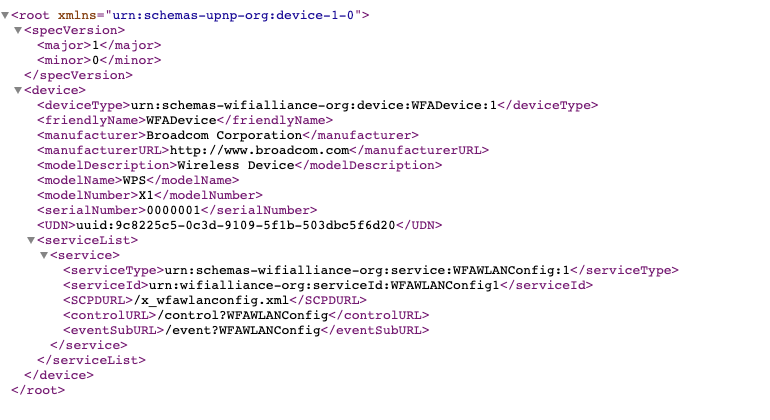
Breaking down this response, we can see a number of different, interesting fields:
- device > deviceType
- device > manufacturer
- device > modelName
- device > modelNumber
- serviceList > serviceType
- serviceList > SCPDURL
- serviceList > controlURL
- serviceList > eventSubURL
All of these have interesting information for us – manufacturer, model, and some more urls