In part 3 of building a PWA vuejs app with wordpress API we will be looking at categories (or archives in wordpress terminology)
At this point, its good to look into the wordpress API – fortunately there is excellent documentation available here: https://developer.wordpress.org/rest-api/
The specific endpoint we are interested in is the ‘post’ endpoint: https://developer.wordpress.org/rest-api/reference/categories/
The first edit we are going to make, is to add a route:
{
    path: '/category_list/:id',
    name: 'categoery_list',
    component: () =>
        import ( /* webpackChunkName: "post" */ './views/CategoryList.vue')
}
The route one will show a list of all categories (we will make a drill-down so that you can see the categories contained within categories)
** Making the category list
Create a new file (CategoryList.vue) and add the following code:
<template>
  <div class="home">
       <Category
      v-for="category in categories"
      v-bind:key="category.id"
      v-bind:category="category"/>
  </div>
</template>

<script>
// @ is an alias to /src
import Category from '@/components/Category.vue'
import axios from 'axios'

export default {
  name: 'categories',
  data(){
    return {
      categories: []
    }
  },
   components: {
    Category
  },
    mounted(){
    axios.get('https://jonathansblog.co.uk/wp-json/wp/v2/categories?per_page=100&parent=' + this.$route.params.id )
    .then(response => {
      this.categories = response.data
      console.log(response.data)
    })

  }
}
</script>
This will fetch the data from the endpoint (we are initially searching for all categories whos parent is the ID nubmer passed in) and loop through each entry (v-for) and render using the (not yet existing) component
Next, create a new component (Category.vue in components) and add the following code:
<template>
  <div>
    <h1 v-html="category.name"></h1>
    <router-link class="btn btn-success" v-bind:to="'/category_list/' + category.id">View Sub Categories</router-link>
  </div>
</template>

<script>
export default {
  name: 'Category',
  props: ['category']
}
</script>

<style scoped>
h1 {
  margin: 40px 0 0;
}
</style>
This will take the input data and render its title, and a link to the individual category route (to display sub categories)
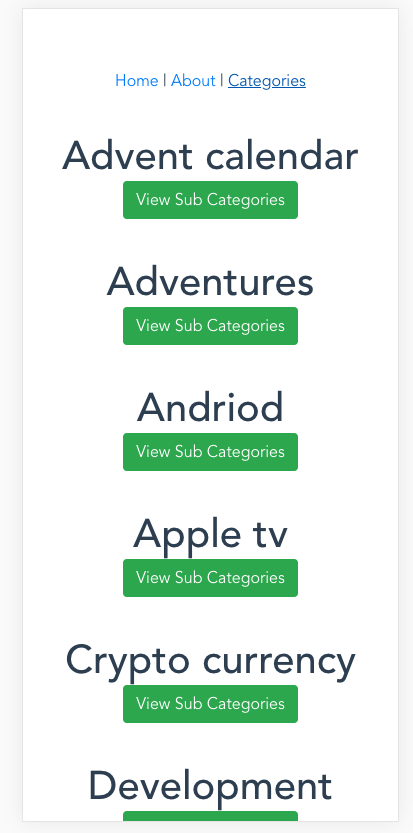
The app is very basic at this point, we will be updating all of the features as we go – for example, the categories should automatically show as a hierarchy, but for now we are only setting up each individual page type
Part 1 Part 2 Part 3 Part 4 Part 5 Part 6 Part 7 Adding Cordova to an existing Vue App